Google Search capture takeaways
- Use a light search for organic listings and a full one-page search to inspect available features.
- Collect expanded People Also Ask answers as a separate step when the questions alone leave a gap.
- Check page and feature coverage before comparing searches.
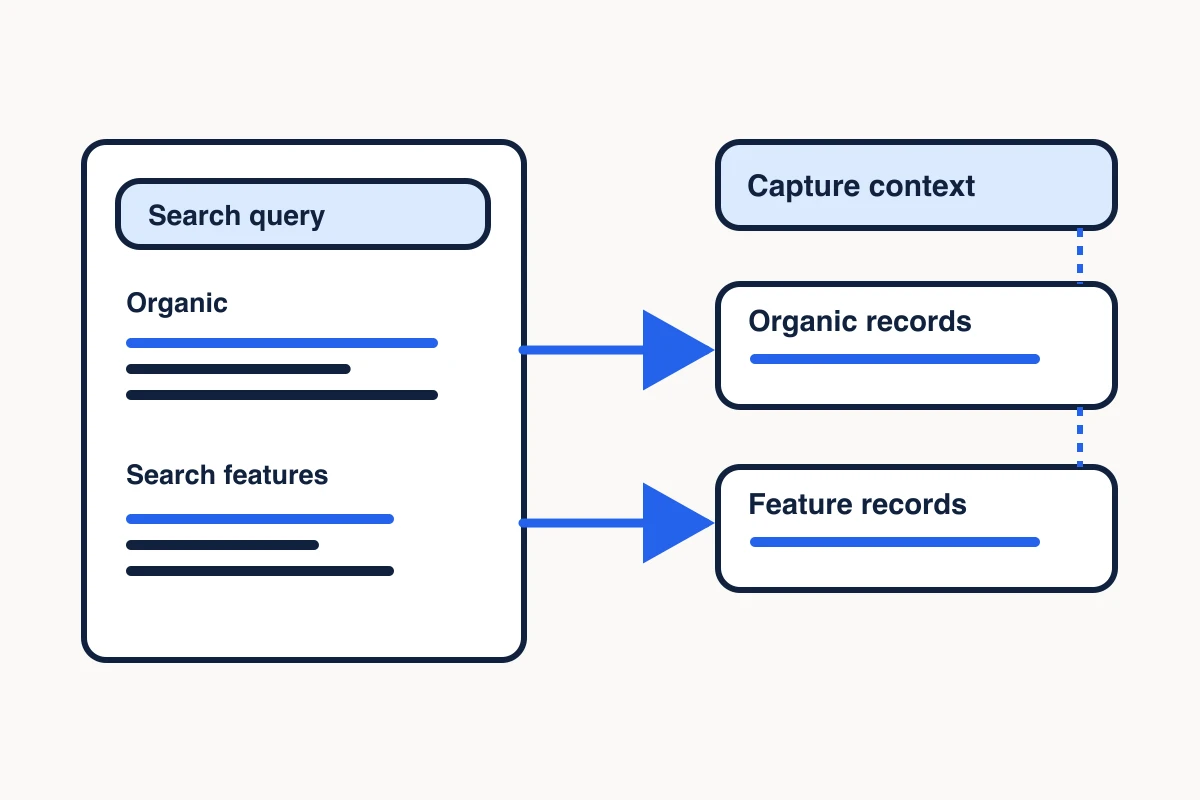
A Google Search scraper turns a search engine results page, or SERP, into records you can inspect and share. For a competitor brief, that might mean the position, title, URL, and snippet of each organic listing. For a content research task, you might also need the questions that appeared in People Also Ask and the sources linked from expanded answers.
Start by defining the records you need. Then choose a capture, check what it actually returned, and export the rows with enough context for a teammate to interpret them.
Run and check your first Google Search capture
Connect MCP Scraper to your client, then start with a Light capture for one Google Search results page. Light mode gives you organic listings for a first pass.
- Ask for one Light Google Search page for “roof repair denver.” Request the returned positions, titles and destination URLs, along with the capture status and page count.
- Check that the response says complete and shows one page captured out of one requested. Open one result URL and confirm it leads to the page you intend to research. Record an unverified location as unknown.
- Export the organic rows with the original query, observation time and page counts. If the response reports fewer pages than requested, label the export partial.
To rehearse the check, open the complete Denver capture. The November 8 run returned ten organic rows from one requested page. The displayed excerpt shows three of the ten, including the Cenco Roofing URL at position 2. The capture did not verify Denver as the search location.
Choose a Google Search capture
Choose the collection mode based on what the next person needs to inspect. If you are identifying competing pages for a service query, organic listings are a useful starting point. If you need to see how the results page presents the topic, look for the features that appeared on that page as well.
| What you need | Capture to use | What to check |
|---|---|---|
| Organic positions, titles, URLs, and snippets | MCP Scraper’s light Google search | Returned rows and page count |
| Available features alongside organic results | Full mode on an unfiltered one-page Google search | Feature status and any fallback |
| Questions with expanded answers and available source links | A dedicated People Also Ask harvest | Returned question count and which entries have answers or links |
| A controlled desktop or mobile comparison | A capture route that documents the required inputs | Evidence that the requested context was applied |
MCP Scraper’s ordinary search uses desktop results and a default market and language. Putting “Seattle” in the query changes the search terms. If you need to request a geographic setting or mobile results, use a capture route that documents those controls and check any returned evidence for the actual context. Google SERP capture in MCP Scraper Docs
If you’re deciding how to collect results in your own application, compare the capture options and see a recorded result on the Google SERP API page.
Separate organic results from search features
Keep organic listings in their own table. Use each returned position, title, destination URL, and snippet as a record of that listing. A snippet tells you what appeared on the results page. Open the destination when you need to check what the underlying page says. Search results versus page extraction
Keep search features in a separate table. Full mode can add available local-pack, forum, video, AI, entity, and People Also Ask preview records on an unfiltered one-page search. Check feature status and the returned fields for the specific run. Date-filtered, two-page, and browser-fallback results can be organic-only.
A People Also Ask preview gives you candidate questions to investigate. If your work requires the expanded answer or its linked source, choose a dedicated harvest, keep its job ID, and inspect the completed result. Some rows may lack an answer or source link. Record that gap and open a cited page when you need to verify the claim before using it. People Also Ask for SEO
Check how much of Google Search the scraper captured
Compare requested and captured pages before counting rows or comparing positions. Then check the result quality, any pagination error, and the status of features you requested. An unsupported feature needs a different follow-up from a feature observed to be absent.
If you’re replacing SerpApi, use the SerpApi alternatives checklist to decide which fields and coverage to preserve. If your reports use DataForSEO Google Organic, use the DataForSEO migration checklist to decide which Search jobs to move and which keyword or backlink jobs to keep.
If you’ll open the results for evidence, record the returned URL, final URL and fetch status separately. In a recorded search-result URL check, Google redirect links reached external hosts, and some direct URLs returned HTTP 403. Check that the fetched page contains the passage you need before using it in a report.
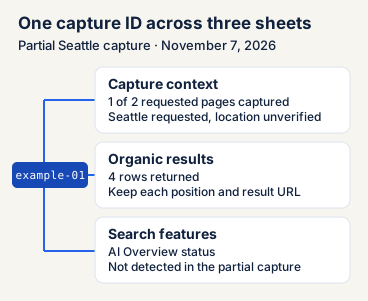
In a November 7, 2026 MCP Scraper API example, a request for “public libraries seattle” asked for two desktop result pages. The receipt showed one captured page with four organic rows. It marked the response as partial, reported page two as unavailable, and returned the failure code invalid_next. Seattle was requested. The receipt left location verification open. Request and response excerpt
A usable handoff for that run would say “Four organic results from one of two requested pages. Page two unavailable. Requested Seattle context, location unverified.” That preserves the result you can work with and gives the next person the condition they would need to recheck.
Export Google Search results with their capture context
Open the full result or artifact before exporting. Use one capture ID to join the capture, organic result, and search feature sheets. For the November 8 Light example, verify all ten organic rows against the one captured page and record feature coverage as unmeasured.
Sources: [source-1]
| Sheet | Columns to include |
|---|---|
| Captures | Capture ID, query, timestamp, mode, requested context, confirmed context, pages requested, pages captured, result quality |
| Organic results | Capture ID, organic position, title, result URL, snippet, source page if returned |
| Search features | Capture ID, feature type, feature status, observed text, linked URL when available |
| Capture ID | Query | Pages requested / captured | Organic rows | Quality and pagination | Location |
|---|---|---|---|---|---|
| example-01 | public libraries seattle | 2 / 1 | 4 | Partial. Pagination error: invalid_next. | Seattle requested. Confirmed location unknown. |
For the November 7 Seattle REST example, put example-01 beside the response’s organic position, title and URL in the results file. Here is one of the four returned rows as comma-separated values (CSV).
capture_id,position,title,url
example-01,2,Seattle Public Library,https://en.wikipedia.org/wiki/Seattle_Public_Library
Record feature status separately. The November 7 capture returned a not-detected AI Overview status for the partial response. Record that status for example-01. The result leaves open what Google displayed beyond the captured response. Leave the observed text and linked URL blank.
capture_id,feature_type,feature_status,observed_text,linked_url
example-01,AI Overview,Not detected in partial capture,,
To check the public Seattle example, open the partial Seattle snapshot. To inspect the rows, select Partial snapshot and match position 2 to the CSV excerpt. The demo shows three of the four returned rows. If you have the full response, check that your export contains all four page-one rows. In either case, record one of two requested pages and leave the confirmed location blank.
For a complete export, use the separate November 8 Light capture for “roof repair denver.” MCP Scraper returned ten organic rows from the one requested page. Denver was in the query. The capture did not confirm a search location. Use example-02 as the join key and record search-feature coverage as unmeasured for this organic-only export. Preview the first three rows. If the next step is comparing local businesses, run a separate Maps lookup and verify each competitor’s Google Maps listing before joining in review data.
Import the next row into a Captures sheet and join it to the Organic results sheet on capture_id. The observation time is in UTC. Keep the confirmed location blank because this run did not confirm one.
capture_id,query,observed_at_utc,mode,pages_requested,pages_captured,organic_rows,result_quality,confirmed_location,search_feature_coverage
example-02,roof repair denver,2026-11-08T04:26:09.789Z,light,1,1,10,complete,,unmeasuredcapture_id,position,title,url
example-02,1,Recomendations for roofing company in Denver - ASAP - Reddit,https://www.reddit.com/r/Denver/comments/1kh2gd3/recomendations_for_roofing_company_in_denver_asap/
example-02,2,Cenco Roofing: Denver Roofer for Roof Repair & Replacement,https://www.cencoroofing.com/
example-02,3,Denver Roofing Services | Premier-Roofing.com,https://premier-roofing.com/locations/denver-roofing/
example-02,4,Best Roofing Contractors in the Denver area and Colorado Springs,https://teamdavelogan.com/company-categories/roofing-contractor-denver-co-colorado-springs-co/
example-02,5,"Top 10 Best Roof Repair Near Denver, Colorado (Updated 2026) - Yelp","https://m.yelp.com/search?find_desc=Roof+Repair&find_loc=Denver,+CO"
example-02,6,"Roofing Company in Denver, CO | Fast Service, Honest Quotes",https://www.mightydogroofing.com/downtown-denver-co/
example-02,7,Elite Roofing & Solar Denver's Best Roofers,https://elite-roofs.com/denver-roofers/
example-02,8,"Best Roofers in Denver, CO | GAF Roofing Contractors",https://www.gaf.com/en-us/roofing-contractors/residential/usa/co/denver?srsltid=AYCX9vKrxZyBoglAvY6ih1juUGlGEdQXAL15RLLtI0mTg5_66DoS60BL
example-02,9,"Roofing Contractors near Denver, CO | Better Business Bureau",https://www.bbb.org/us/co/denver/category/roofing-contractors
example-02,10,"Sol Vista Roofing: Roofing Company in Denver, CO",https://solvistaroofing.com/Open the ten-row organic export (CSV) and the one-row capture context (CSV). Import both as CSV so quoted commas stay inside the right cell. Join on example-02, verify positions 1 through 10 and keep the blank confirmed-location field. Send both files together so a teammate can distinguish the returned rows from unmeasured search features.
Use Google Search results in an SEO workflow
Use a checked Google Search dataset to shortlist pages for a competitor brief, see which page types appeared for a query, or identify questions worth further research. For comparisons across captures, align query, capture settings, and depth as far as the evidence allows. Record any differences before interpreting changes.
If the questions will guide a writer, turn them into a People Also Ask content brief with section assignments and source checks.
Keep the search record and the source evidence separate. For the roofing example, keep the query, capture date, position and destination URL in the search record. If your brief makes a claim about a roofer’s services, open or extract the selected page and record the checked passage with its own capture date. The Google listing alone supports what appeared in the capture.
For a local competitor brief, use the organic result to shortlist a business, then verify the listing separately. Cenco Roofing appeared at position 2 in the November 8 capture. The November 10 Maps lookup matched the same website to a Lakewood listing for a company that advertises roof repair in Denver. Open the matched Maps review sample to see what the listing and the five sampled reviews can support. Keep the organic position, listing identity, and review observations in separate fields. The organic position does not establish a Maps rank.
If a teammate will reuse the evidence, save the checked source in Library, the Memory Vault for source material. Link your finding to the saved note. In the later session, open that exact note and compare the source URL, date and relevant passage with the original. Inspect the recorded Memory Vault reopen for a separate NewsCatcher page extraction that was saved and read back in full.
Sources
- Google SERP capture in MCP Scraper Docs.https://mcpscraper.dev/docs#google-serp-capture
Check the output before you export
Inspect a recorded Google Search response and compare its returned rows with the capture scope.
Inspect the Google Search sample