Saving scraped research in Memory: the essentials
- A supported scrape can be saved to Library when you request it; saving is not automatic.
- Keep source material and your interpretation as separate, linked records.
- Check the saved note, its search availability, and the material retrieved for the next task.
- Revisit changing sources when the decision needs current facts.
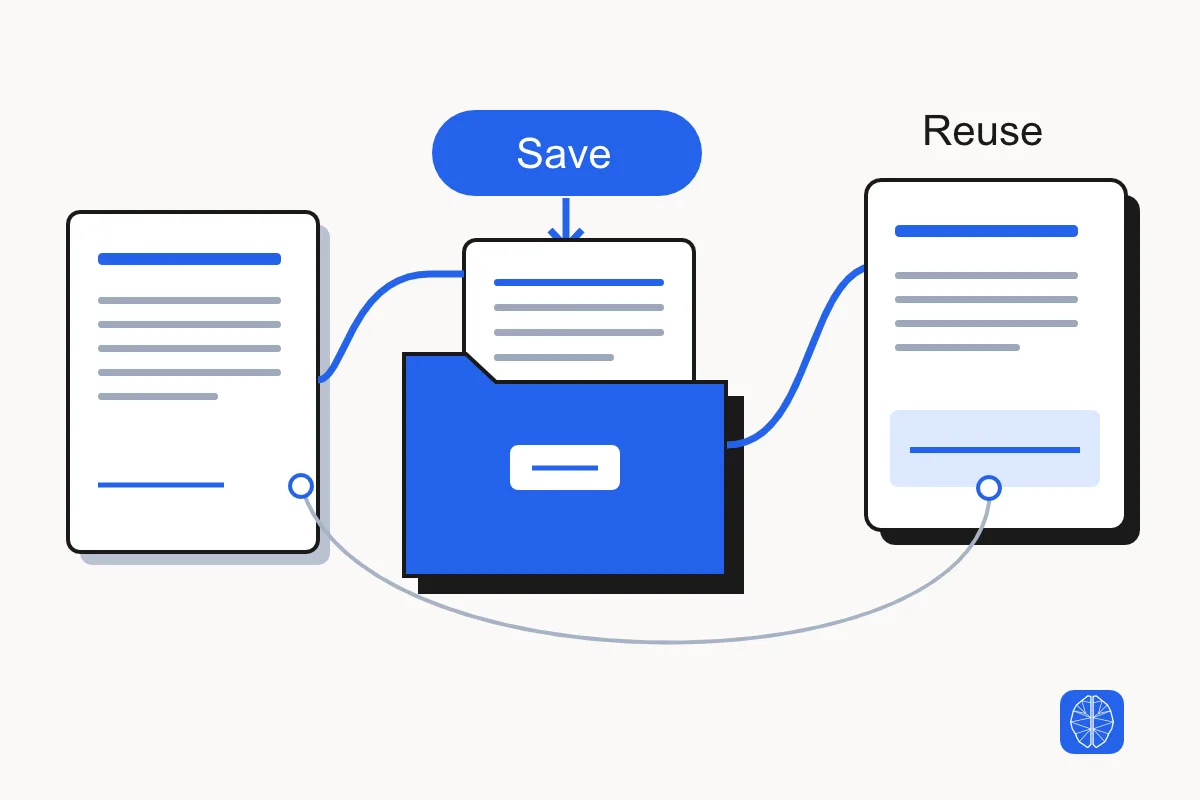
To save scraped research in a Memory Vault, retain the useful source material with its URL, capture date, and collection limits. Keep your findings in a separate note that points back to the source. Before relying on that research in a later task, find the saved note and open its full content.
Consider a competitor-research brief. A summary that says “the offer has changed” is difficult to check a month later. The captured offer page, the date you read it, and a note explaining the observed change give the next task something concrete to work from. A saved summary can help you resume; the underlying evidence lets you verify it.
MCP Memory provides hosted notes and recall through compatible MCP clients. It is optional and separate from the scraper subscription. This guide covers the practical handoff from collected web evidence to useful retained research.
Decide which scraped evidence belongs in Memory
Save the source material you expect to use again: a page behind an important finding, a useful research collection, or evidence needed to explain a decision. A temporary result in a chat and a note in your hosted Memory account are different records. Ask for retention when the work needs it.
MCP Scraper can deposit supported scrape results into Library when you request that operation. Library holds source material; a Knowledge note can hold the useful explanation you distill from it. Do not assume a successful scrape or a download link means a Library note was created.
A one-off page you can easily revisit may not need a vault entry. Save when the capture itself matters: the wording could change, the collection was expensive to repeat, or another task needs the exact evidence you reviewed. Selective retention also makes the useful material easier to distinguish from discarded research.
Check scraped evidence before saving a finding
Check that a scraped source contains the material your finding depends on before treating it as durable evidence. Open the returned text or artifact and compare it with the requested page, fields, or collection scope. Saving an incomplete result preserves the same gap.
A source note should identify what was captured and what remains unknown. Keep the original page URL and title, the capture date, the relevant text, and the scope of the request. For a collection, record returned coverage and important failures or omissions. A page publication date and the date you collected it answer different questions; preserve both when available.
The web collection tools provide different routes for search, page extraction, and site collection. Retain the evidence returned by the route you actually used. A search snippet is useful discovery material, but it is not the full source page. Compare search results versus page extraction if you are deciding which representation to preserve.
Save the source deliberately in Library
Ask your compatible MCP client to preserve the supported, reviewed result in Library, the Memory vault used for source material, and include its provenance. Be explicit about the destination and what must survive. The following request is an illustrative instruction you can adapt; it is not a record of a save performed by this guide.
Save the reviewed source material from this research in Library.
Keep the source URL, title, capture date, collected text, and coverage limits.
Preserve it as source evidence; do not replace it with an AI summary.
Return the saved note location and the result of reading it back.
If this operation cannot save the complete material, explain the gap.
Check the destination reported by the save operation you used, then open that exact note. Confirm that the useful source text is present, the URL and date survived, and the limitations still mean the same thing. If Library Ingest returned an unclear outcome, look for the note before retrying. Keep the original source title and capture timestamp when repeating the same save.
Use the current SDK tool catalog for the operation you chose. Supported retention routes and receipts differ. If a result is too large or unsupported, keep the actual limitation and use a supported import or a deliberate smaller selection rather than silently substituting a summary.
Keep source notes and research findings separate
A source note preserves what you collected. A finding note explains what you think that evidence means. Link the finding to the source so a later task can inspect the observation without mistaking your interpretation for original page text.
For an illustrative competitor-offer review, the source note might hold the captured product page and date. The finding could say which offer detail needs consideration in your brief, identify the supporting passage, and state any uncertainty. Do not turn an inference such as “this seems aimed at larger teams” into something the competitor explicitly said.
Keep the finding concise enough to use and the source complete enough to check. When a conclusion depends on several pages, link the relevant source notes and explain what each contributes. A folder full of captures can preserve evidence while still leaving the next researcher unsure which decision it supports.
| Record | Keep | Use it to answer |
|---|---|---|
| Source note | Collected text, source URL, capture date, scope, and limitations | What did we actually observe? |
| Finding note | Conclusion, supporting source links, reasoning, and uncertainty | What does that evidence mean for this task? |
For a local competitor brief, use two source notes for Cenco Roofing. Keep the query, capture date, homepage and organic position from the November 8 Google Search export in one note. Record that the search location was unconfirmed. In a second note, keep the listing ID, Lakewood address and five returned review cards from the November 10 Maps sample. Record that the order of the five returned review cards was unverified. The two captures list the same website. The organic position does not establish a Maps rank.
In the finding note, link to both sources and record the decision: keep Cenco on the research shortlist and hold a proposal to promise an inspection photo handoff in the client’s copy. The five sampled Cenco cards did not explicitly describe that handoff. Ask the client’s service lead what the client actually delivers before updating the brief. This is an example note layout assembled from two public captures.
Verify saved, indexed, and retrieved states
To verify one source note in Memory Vault, find it with memory-search and reopen the full note with memory-get. Match its source URL, capture date, and supporting passage to the evidence you need. A saved record, searchable content, and a verified source are three separate checks. A search result can be the wrong version or only a preview.
The current documentation distinguishes storage from search readiness for supported imports. Inspect the operation’s reported index or search state when it provides one. Then test the actual research task. In a compatible client, use memory-search to find candidates in the intended vault and memory-get to open the exact note path. Search returns excerpts. Its date filters use the note’s last update time, so check the capture date in the opened note when the age of the source matters.
In a later session, ask for the source evidence behind the finding before asking the AI to continue the brief. Check the note’s URL, capture date, and scope against the question. Open the full note when the search result includes its path. If it gives only the source URL, use the vault and note path from the original save receipt. If several captures exist, check the source URL and capture date in the opened note to identify the evidence behind the finding.

 Saved
Keep the vault and note path from the save result.
 Found in search
Use search to find a candidate. If the result has no note path, use the path from the save result.
 Verified in the full note
Check the source URL, capture date, and relevant passage.
| State | Evidence to inspect | What still needs checking |
|---|---|---|
| Saved | Returned note location and the stored material read back from that destination | Whether the relevant content is available to search |
| Indexed or search-ready | The supported operation’s reported search/index state, when available | Whether the next query returns the intended note and version |
| Retrieved for the task | The full returned note, source URL, date, and relevant passage | Whether the source is still current and supports the conclusion |
Sources: [memory-product] [tool-docs]
See how we verified each state in the saved competitor-research example.
If search misses the source but you have its exact note location, try reading that record directly and check the reported processing state. If the note is missing or lacks the required text, investigate the original save before creating duplicate copies. Do not describe an unresolved save or index problem as successful recall.
Refresh saved research when facts can change
To keep dated competitor ad captures in Memory Vault, save the earlier capture and the newer observation as separate source notes. Put the source URL, capture date, and what the lookup actually returned in each note. Link both notes from the finding and say which claim needs review. If the newer lookup does not confirm a field, mark it unverified instead of overwriting the earlier observation.
Revisit a saved source when the decision depends on current information. A captured pricing page can show what was observed on its capture date; it cannot establish today’s price. The same distinction applies to product availability, terms, contact details, and other changing facts.
Keep the earlier capture’s date and source context when recording a newer observation. Explain what changed and which finding needs review. MCP Memory supports linked notes and fact history, but a workflow still needs a deliberate update when information changes. Saving a source does not, by itself, establish continuous monitoring or synchronization.
Choose a refresh trigger that matches the task. Recheck commercial terms before relying on them in a recommendation. Recheck a competitor claim before quoting it in a new client brief. Stable reference material may be reusable for longer, provided the saved source still answers the current question. Memory keeps context available; it does not make stale evidence current.
Export retained research for a handoff
MCP Memory lets you read, edit, copy, and download notes as Markdown, with export available one vault at a time. Use the appropriate vault export when a colleague or another workflow needs a copy of retained research.
Open the resulting export and check the actual files before calling the handoff complete. Confirm that the needed source notes, finding notes, dates, and links are present. If the work spans several vaults, account for each relevant vault separately. A successful export request for one vault does not establish that every related record or original media file was included.
Explain any dependency the recipient still needs: access to an original source, another vault, or a separately stored artifact. An export is a copy of the returned material. It does not prove that a different AI client has imported it, can search it, or has the permissions to read the original account.
If another AI application will answer from the export, import one source note there first. Ask a question you can check against the original passage. Verify that the application returns the correct source URL and supporting text before importing the rest. If it misses the note, check the destination’s import and search status before repeating the scrape.
Finding: NewsCatcher ties search result freshness to the underlying index.
Source URL: https://www.newscatcherapi.com/blog-posts/web-scraping-api-vs-web-search-api
Captured (UTC): 2026-11-06
Evidence: The Data freshness row on the extracted page. The search snippet omitted this condition.
Recipient check: Open the source and find the row before citing the finding.
Limit: This capture records what the publisher wrote. To assess current API freshness, collect fresh evidence.
This handoff is an editorial summary of the verified capture. In a private handoff, include the authorized note or export file so the recipient can reopen the stored evidence.
Reuse a saved competitor-research brief
To continue a competitor-research brief, retrieve the saved source notes and the linked findings before writing the next recommendation. We tested saving, searching for and reopening the source note with a public NewsCatcher article. We saved the extracted Markdown in a dedicated Memory Vault, searched that vault for the comparison, then reopened the exact note through a separate authenticated REST API read.
- Start with the November 6, 2026 extraction of NewsCatcher’s comparison of search and scraping APIs. Its Data freshness row qualifies search results by the underlying index. The search snippet omitted that condition.[research-newscatcher]
- We saved the full extracted Markdown with the NewsCatcher URL and capture date. The save reported 72 indexed chunks.
- Write a separate finding for the brief: NewsCatcher describes freshness as dependent on the search index. Link the finding to the source note. Any claim about an API’s current results needs fresh evidence.
- Our vault search returned a metadata match. The MCP artifact download did not complete this check. A separate authenticated REST API read opened the path recorded by the save and verified the source URL, capture date, and all 30,544 bytes of the original extracted Markdown. When you repeat this workflow, open the full note and check those details before citing the finding.
- Reopen the publisher page if the new brief needs current wording. If it changed, keep the original observation and date the new one.
A useful continuation request is: “Find the saved source notes behind this competitor brief. Open the relevant full notes, show their URLs and capture dates, and identify any evidence that needs a fresh check before we update the recommendation.”
The next researcher should be able to open the exact source behind the finding and see whether it needs a fresh check. See the original search and extraction example.
Memory Vault verification record for the NewsCatcher source
Use the same checks for your own source handoff. Keep the vault and note path in your private record. Before reusing the evidence, compare the opened note’s URL, date, and full text with the original capture.
Source URL: https://www.newscatcherapi.com/blog-posts/web-scraping-api-vs-web-search-api
Capture date (UTC): 2026-11-06
Save reported: 72 indexed chunks
Vault-scoped search: Returned a metadata match
Separate authenticated REST API read: Opened the saved note path and matched the source URL and capture date
Full stored Markdown: 30,544 bytes, exact match to the original extraction
Revision field: Not exposed by the read responseMCP Memory subscriptions and client access
Do I need a scraper subscription to use MCP Memory?
No. MCP Memory can be used independently and has its own plans. The scraper can supply supported web results for deliberate retention; the products serve different parts of the workflow.
Can another AI session use my saved research?
A compatible MCP client connected to the appropriate account can use available Memory tools. Client capabilities and access vary. Search for the research and open the relevant full notes rather than assuming a new session already has them in context.
Sources
- NewsCatcher. (2026-04-29). Web Scraping API vs Web Search API: A Developer’s Guide to Choosing the Right Tool. Accessed 2026-11-06.https://www.newscatcherapi.com/blog-posts/web-scraping-api-vs-web-search-api
- MCP Scraper. Memory — MCP Scraper. Accessed 2026-11-06.https://mcpscraper.dev/memory
- MCP Scraper. API & SDK Reference — MCP Scraper. Accessed 2026-11-06.https://mcpscraper.dev/docs
- MCP Scraper. Scraper — MCP Scraper. Accessed 2026-11-06.https://mcpscraper.dev/scraper
See a scrape saved to Library
Open the scrape-to-Library demo and check which source URL, vault and note path the example preserves.
Open the scrape-to-Library demo