What to check before using a website crawl
- Define the pages and fields your research needs before judging whether a crawl is complete.
- Reconcile discovered, attempted, successful, failed and remaining URLs; a page limit is a ceiling, not a page count.
- Inspect returned content. HTTP success, usable extraction and Google indexing are separate outcomes.
- Keep successful captures when a run is partial, and investigate the missing scope before starting replacement work.
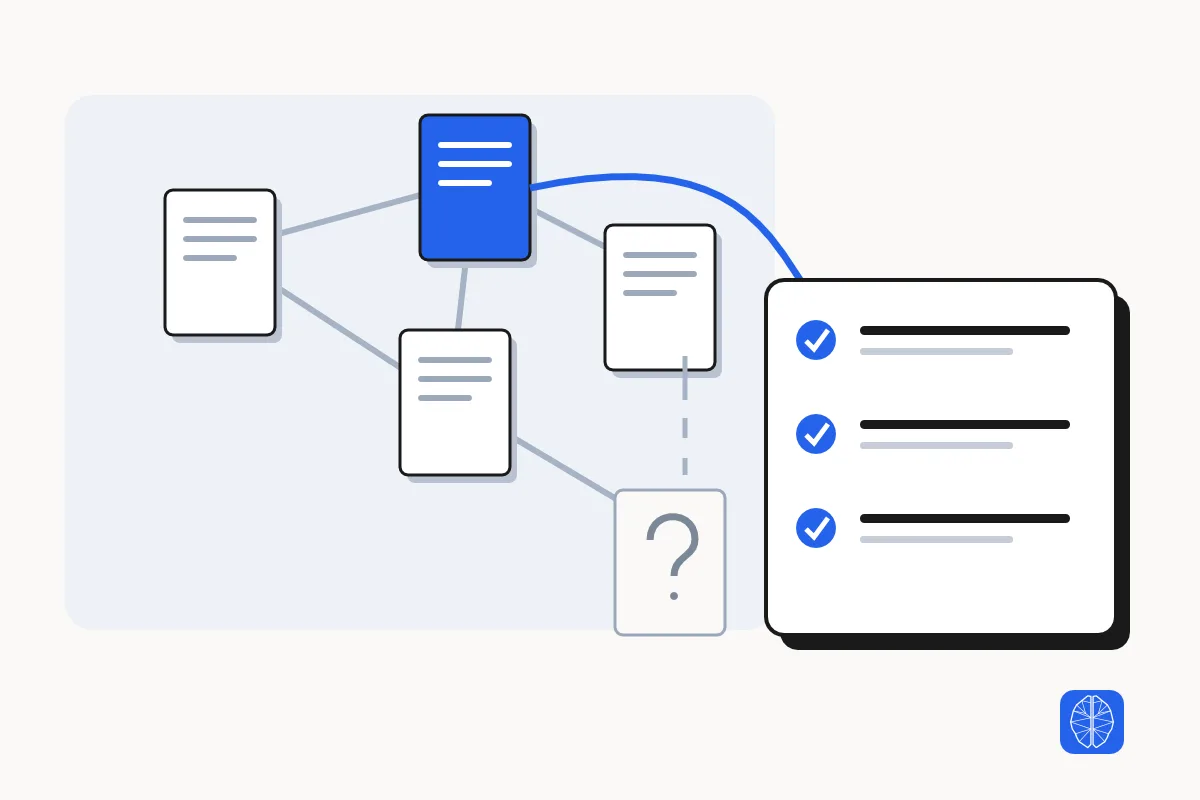
A website crawl is complete for a stated research scope when every required page has a usable capture or a justified exclusion, and the captures contain the information the task needs. A job marked finished, or a large folder of page files, cannot establish that on its own.
For an SEO researcher, missing pricing or service pages can change a competitor brief. For an agent builder, a page that contains only navigation can make a knowledge base look populated while leaving its answers unsupported.
Use this checklist to decide what the crawl supports, what remains missing and whether further collection would change your conclusion.
Define what a complete website crawl must contain
Crawl completeness needs a defined scope: which URLs or page types matter, which fields must be returned and when the material was collected. Without an expected population, you can describe what a crawler found, but you cannot prove that it found every page on the site.
Start with the research decision. A competitor offer review may need current product, pricing and service pages. A technical audit needs a different population and different evidence. An archive containing both kinds of page is not automatically adequate for either task. Compare search results versus page extraction before deciding which source records the brief actually needs.
- State the allowed host, subdomains, paths and languages.
- Name required page types and fields, such as main text, title, source URL and publication date when present.
- Record intentional exclusions, including duplicates, private areas or file formats outside the capture method.
- Define what would make the result unusable: for example, no pricing-page capture when the question is about pricing.
Build an expected URL list before checking crawl coverage
An expected URL list gives you a denominator independent of the crawl result. On a site you own, compare the relevant published content inventory, XML sitemap and internal-link discovery. On a site you do not own, record which of those sources are actually available.
A link-following crawler can miss a page that has no discoverable path from its starting URL. A sitemap can contribute URLs the crawl did not find, but the sitemap itself is not proof of a complete or current website inventory. Treat a search-engine result list as another discovery lead, not an exhaustive page list.
Record where each URL came from and how you handled it. For a redirect, keep the requested URL and the destination you actually reached. If two URLs appear to cover the same page, check that the returned content serves the same purpose for your research before counting them together. Record intentional exclusions, such as PDFs outside the scope, separately.
required URLs with no usable capture
= expected in-scope URLs − URLs with verified usable content

Review each difference as:
not discovered | not attempted | failed | content incomplete | excluded with reason
If the site population remains unknown, keep that limitation in the final research note. A complete list of discovered URLs is still only a discovered list.
Reconcile discovered, attempted and successful crawl URLs
Crawl counters describe different stages of collection. Read the tool’s definitions and inspect the URL-level records before treating the totals as a coverage measure. The most useful question is which required URLs have a usable result, rather than whether the run returned a large number.
| Run field | What to check | What it does not establish |
|---|---|---|
| Requested or effective limit | The maximum scope the run was allowed to attempt, including any reduced cap. | That the site contains this many pages. |
| Discovered | URLs identified by the run’s discovery method. | That every relevant URL exists in the discovered set. |
| Attempted | URLs for which the run attempted collection. | That the attempt returned usable page content. |
| Successful | The operation’s recorded successful captures. | That every required field is present or correct. |
| Failed | URLs with a recorded failure or unusable capture state. | That the public URL is necessarily broken. |
| Remaining | Known work left unattempted or unresolved under the tool’s accounting. | That the remaining work is irrelevant. |
Check whether the run stopped because its frontier was exhausted, its page or credit ceiling was reached, a time limit intervened, or errors prevented continuation. If the totals do not reconcile, investigate the actual statuses; some tools also track skipped, excluded or deduplicated URLs. Do not force every tool into one arithmetic formula.
Check captured page content as well as HTTP status
A successful HTTP response shows that a server returned a response; it does not show that the intended content was extracted. Open the saved page representation and check the information your research needs. A login screen, empty application shell or error message can be returned where the useful page content should be.
Inspect at least one example of every materially different page type, plus every capture that could change the decision. For a competitor offer review, read the actual offer and pricing captures rather than only a homepage sample. Compare important returned fields with the source page when the extraction looks thin or inconsistent.
If the required fields appear only after a click or scroll and you are choosing where that automation will run, compare a managed browser with hosted scraper execution. Run the same interaction and check the returned records before expanding the crawl.
If you are considering replacing an existing page extraction or crawl workflow, compare Firecrawl alternatives by the job you need to keep running. Check the same required URLs and fields before moving a recurring job.
Check that the main text includes the relevant section, table, pagination or dynamically loaded content. Check source URL, collection time and field meaning. “Not present on the page” and “not captured by this method” must remain different states.
If the crawl found the right URL but the extracted records are incomplete, compare the raw response, rendered page, and scraper output to see where the records disappear.
Sampling is a quality check, not proof that every unsampled record is sound. Record the sample and its limits. When a missing field is essential to the decision, resolve that page individually or leave the conclusion incomplete.
Record the URL, capture status, required field, observed field result and next action. Keep a URL with an essential missing field unresolved even when the crawler counted the fetch as successful.
Diagnose missing crawl pages from the first failed boundary
Diagnose a missing page by locating where the collection stopped: discovery, eligibility, fetching, rendering or extraction. That distinction tells you which check is likely to help and avoids repeating an unchanged crawl.
If you suspect a crawl restriction, check the robots.txt rule for the crawler and URL you used. For a Google indexing question, check the noindex directive separately. Google has to fetch the page to read that directive, so a page can be captured successfully while still carrying noindex. Once you have checked coverage and URL behavior, turn crawl findings into an SEO fix list with a retest for each issue. See Google’s noindex documentation.
| Observed problem | Discriminating check | Useful next step |
|---|---|---|
| A required URL was never discovered | Inspect its known linking page, sitemap entry and the crawler’s allowed host/path scope. | Supply the known URL or repair discovery on a site you own. |
| Only the homepage or category page was captured | Compare the source and rendered page for the expected links or pagination. | Use a supported rendering or interaction route when the links require it. |
| URLs failed with timeouts or rate limits | Read the actual failure and check whether the source is currently reachable. | Reduce pressure or retry the affected scope when permitted; retain the failure. |
| A URL responds but has no useful extracted body | Inspect the response type and saved content. | Use a method suited to that format or record a justified exclusion. |
| The run reached its cap with known work left | Compare the cap and remaining list with required URLs. | Narrow the task or continue supported collection within the allowed scope. |
Respect the source’s access controls and collection rules. A different rendering method does not grant access permission. If the required content cannot be acquired through an authorized route, record the gap rather than silently replacing it with a snippet.
A real crawl example: 28 discovered URLs and 26 successful captures
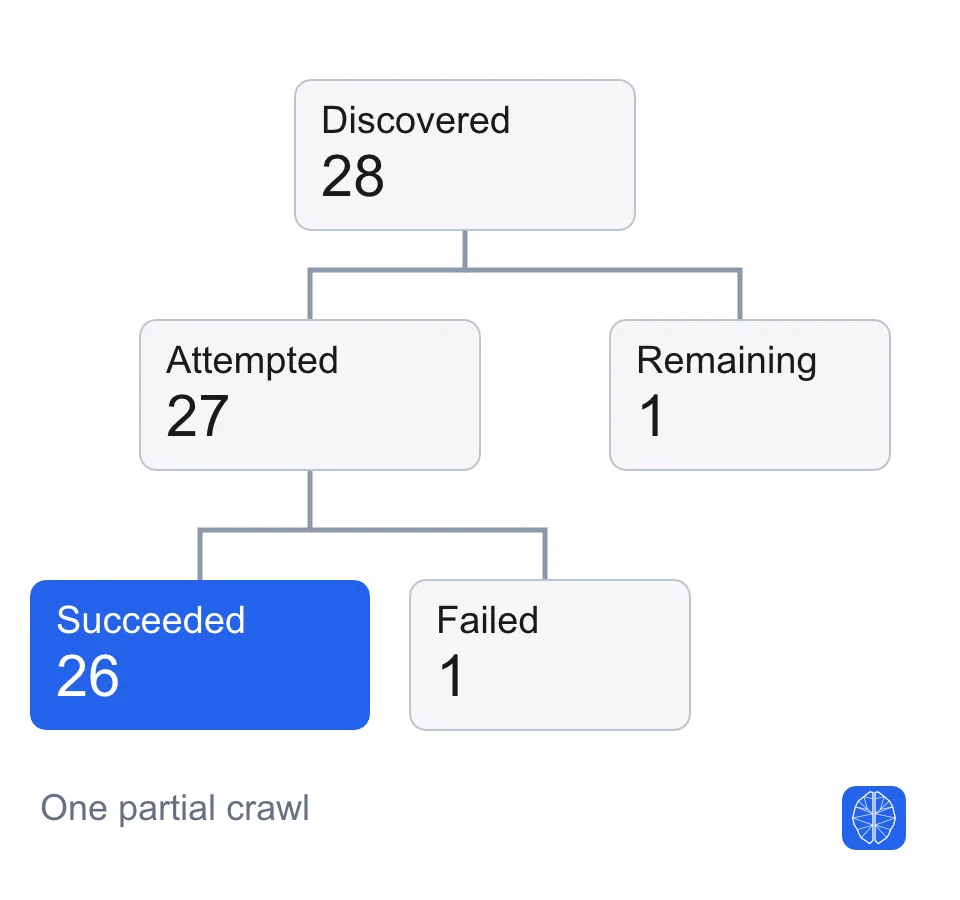
In an MCP Scraper technical audit of mcpscraper.dev on November 6, 2026 Mountain time, the run discovered 28 URLs and recorded 26 successful captures. The run was partial. Its counters show why the successful-capture count alone would have been a poor completion claim.
| Recorded field | Value |
|---|---|
| Requested / effective maximum pages | 200 / 200 |
| Discovered URLs | 28 |
| Attempted URLs | 27 |
| Successful captures | 26 |
| Failed captures | 1 |
| Remaining URLs | 1 |
| Credit-limited / credit-truncated | No / No |
Sources: [crawl-study]
Sources: [crawl-study]
The failed capture was /llms, which returned HTTP 200 with text/plain content. The HTML extraction workflow did not treat that response as a successful page capture. Calling the URL broken would have confused a capture-method limitation with a website failure.
Repeat the status and content-type check to verify how /llms responds now. Keep that result separate from the historical extraction record and the unnamed remaining URL.
We checked the original job’s status against its export manifest. The status counted 28 discovered URLs. The manifest listed 27 attempted URLs, with 26 successes and one failure. The status counted one remaining URL without naming it, so we could not tell whether it was a page the research needed. The run finished below its 200-page cap.
Run: Partial. Discovered 28, attempted 27, succeeded 26, failed 1, remaining 1. Page cap 200.
Failed URL: /llms returned HTTP 200 with text/plain. Classify as an HTML-extraction mismatch.
Remaining URL: Unnamed in the returned status. Whether it was required remains unknown.
Next check: Compare your required URL list with the manifest. Verify any missing priority URL directly.
Use the same check on your crawl. Match your required URLs to the manifest, then open the successful captures that contain the fields you need. If a required URL has no usable capture, record that gap before relying on the crawl for a decision.
Read the public crawl example for the recorded scope, counters and interpretation. This single run does not establish completeness of every route on the website or performance on other sites.
Recover a partial crawl without discarding successful evidence
Recovery starts by inspecting the original run and keeping its successful captures. A partial result may already answer a bounded research question; an unresolved critical page may prevent the answer. Let that distinction determine the next collection step.
If a request times out before you know its outcome, check the original job status before submitting replacement work. Where the tool provides an idempotency key, follow its documented retry contract. A timeout does not prove that no work occurred.
Read the retained failure details and artifacts. Retry only the failed or missing scope when the tool supports it, and change the condition that caused the failure. A full rerun with the same settings is unlikely to explain an undiscoverable URL or an unsupported content type.
Keep the original and recovered results separately dated. If a retry collects changed content, do not present it as one simultaneous snapshot. If no supported resume route exists, create a clearly scoped follow-up capture and reconcile it against the original inventory.
Decide whether the crawl is complete enough for your research
A crawl is ready to use when its remaining uncertainty cannot overturn the specific conclusion you intend to draw. Record that decision against the required URL and field list, with a reason for each exclusion. There is no universal page count or completion percentage that can make that judgment for you.
- Complete for the stated scope: every required URL has a verified usable capture or an explicitly justified exclusion, and essential fields have been checked.
- Usable partial evidence: the captured subset supports a narrower conclusion, and the missing material is named beside that conclusion.
- Not ready for the decision: an essential page, field or source boundary remains unresolved. Continue collection or withhold the affected answer.
Attach a coverage note to the research output: the question, expected URL sources, collection date, limits, captured URL list, checks performed, failures, exclusions and next action. Preserve the result that supports the conclusion, rather than only the conclusion itself.
For a workflow that feeds these results into an agent, see web data for AI agents. The same coverage boundary should travel with the data.
Run and verify a website crawl with MCP Scraper
Use MCP Scraper’s collection tools according to the evidence you need: URL discovery, page content or a technical audit. Then inspect the original job and its returned page records before using the result.
- Use map_site_urls when the immediate job is discovering URLs. Treat its list as the result of that discovery method.
- Choose extract_site for a multi-page content capture, or audit_site for technical SEO evidence. Set a scope and page ceiling suited to the task.
- For extract_site or audit_site, keep the job ID and poll check_site_export. Complete and partial exports both offer readback, so check the counters and status before treating the result as complete.
- Use site_export_read to list the export manifest and read an individual page’s retained JSON, HTML, or Markdown. If the manifest spans several responses, follow the manifest assembly and hash check before counting its records. If map_site_urls returns an artifact ID, use report_artifact_read for the full URL inventory.
- Reconcile the required URLs and fields, record limitations, and deliberately retain evidence when a later task will need it.
Explore the website collection tools and use the current tool documentation for supported inputs, limits and returned readers. Site behavior and access rules vary; no tool connection guarantees a complete capture.
Methodology and limitations of this crawl checklist
This guide draws on MCP Scraper documentation, the linked guidance on missing crawl content and Google crawling, and one documented audit of MCP Scraper’s public website. Use the checklist to decide whether the capture supports your research task.
The worked example preserves its original partial status and counters. It is not a multi-site benchmark, a customer result or proof that every route was discovered. The discussion of captured-content inspection does not imply that every record was manually verified.
A third-party crawl, an HTTP response, extracted content and Google’s indexed version are separate evidence surfaces. Use the appropriate tool for each question. This article does not diagnose why a particular page is absent from Google or claim that a complete research capture will improve rankings.
Sources
- MCP Scraper. (2026-11-06). MCP Scraper public-site crawl: scope, counters and limitations. Accessed 2026-11-06.https://mcpscraper.dev/blog/data/website-crawl-completeness.json
- Screaming Frog. How To Debug Missing Pages In A Crawl. Accessed 2026-11-06.https://www.screamingfrog.co.uk/seo-spider/tutorials/how-to-debug-missing-pages-in-a-crawl/
- JetOctopus. (2022-05-26). Why are there missing pages in the crawl results?. Accessed 2026-11-06.https://jetoctopus.com/why-are-there-missing-pages-in-the-crawl-results/
- Google Search Central. (2025-12-18). Troubleshoot Google Search crawling errors. Accessed 2026-11-06.https://developers.google.com/search/docs/crawling-indexing/troubleshoot-crawling-errors
- Google Search Central. Block Search indexing with noindex. Accessed 2026-11-06.https://developers.google.com/search/docs/crawling-indexing/block-indexing
- MCP Scraper. MCP Scraper documentation. Accessed 2026-11-06.https://mcpscraper.dev/docs
- MCP Scraper. Web Scraping for AI Agents. Accessed 2026-11-06.https://mcpscraper.dev/use-cases/web-scraping-for-ai-agents
Try a bounded crawl
Choose a website and the pages you need, then use the workflow finder to plan a small crawl and check its coverage.
Open the scraper test selector