 MCP Scraper
No built-in schedule
The trackers run daily on their own. Here your AI client’s scheduler or a cron job does the repeating.
Ask ChatGPT, Gemini or Claude your buyers’ questions from the AI you already use. See whether your brand was named, whether your site was cited, and what the assistant searched before it answered.
Example session with invented brands: what one check brings back.
Brands in the answer
Named, and in what order
Your site in the sources
3 sites checked
One check is one question, on one assistant, run once. It comes back as data your AI can read, compare and save, so every number you report later can be traced to the answer behind it.
The full text the assistant gave, so you can read how it described you.
Up to 25 names: named or not, how often, in what order, and the words around the first mention.
Kept apart, each with its site type (news, Reddit, review site, competitor and ten more), how often it was cited and, for Gemini and Claude, the passage quoted.
Shown when the assistant shows them: signed-in ChatGPT and Claude do. ChatGPT’s product lookups and image searches are listed apart.
Cited, looked at but not cited, or absent, for your domain and each competitor’s.
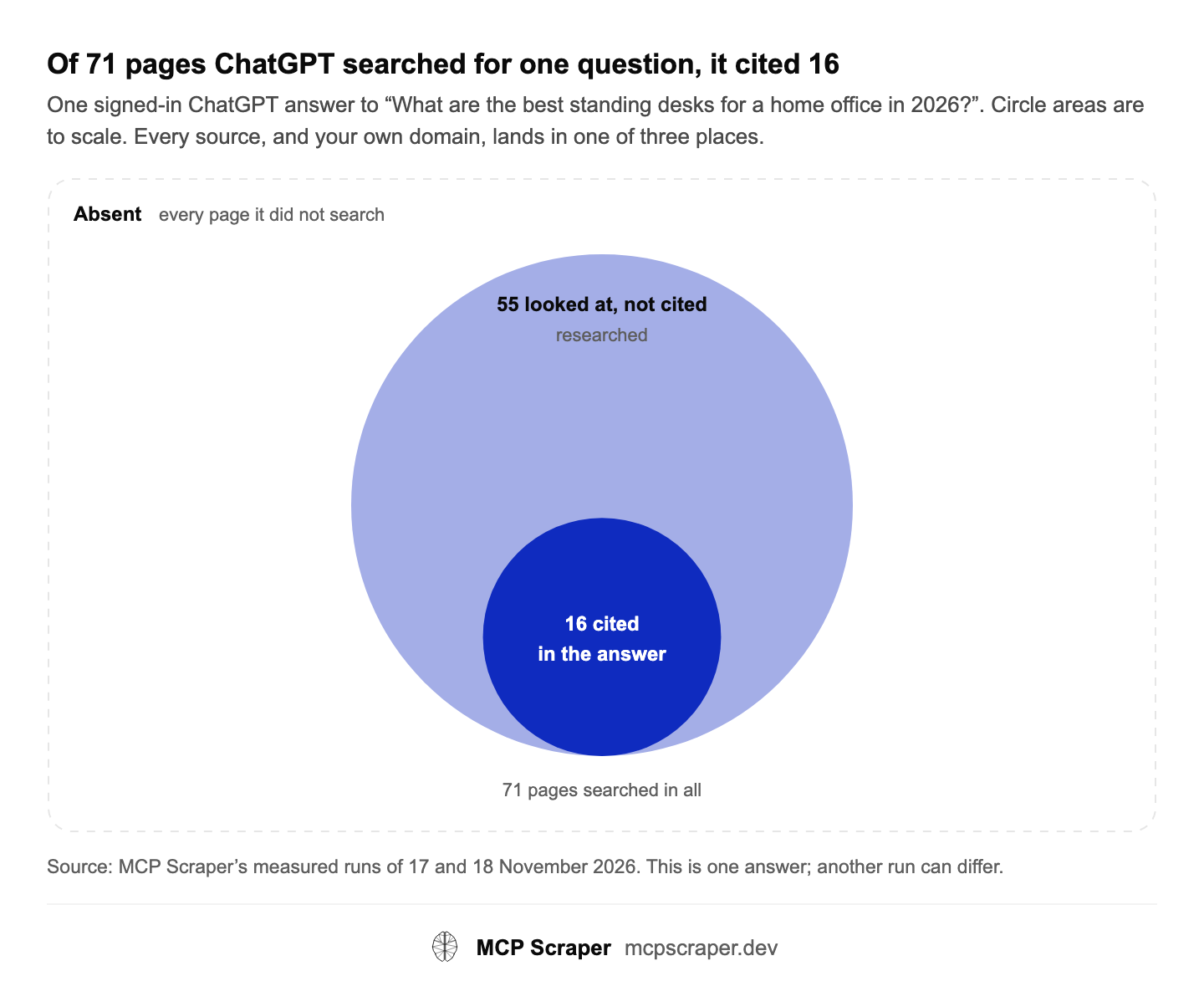
Every page an assistant uses falls in one of three places, and so does your domain. A page that was looked at but not cited is the closest miss: the assistant read it and chose other sources. Pass your competitors’ domains and you get the same answer for each of them.
One signed-in ChatGPT answer to “What are the best standing desks for a home office in 2026?”. Circle areas are to scale. Every source, and your own domain, lands in one of three places.
Tap a circle to read what that outcome means for your site.
| Outcome | Pages | What it means for a site |
|---|---|---|
| Cited | 16 | Named as a source in the answer |
| Researched (looked at, not cited) | 55 | Read while researching, left out of the answer |
| Absent | every page not among the 71 | Not searched for this question |
Source: MCP Scraper’s measured runs of 17 and 18 November 2026. This is one answer; another run can differ.
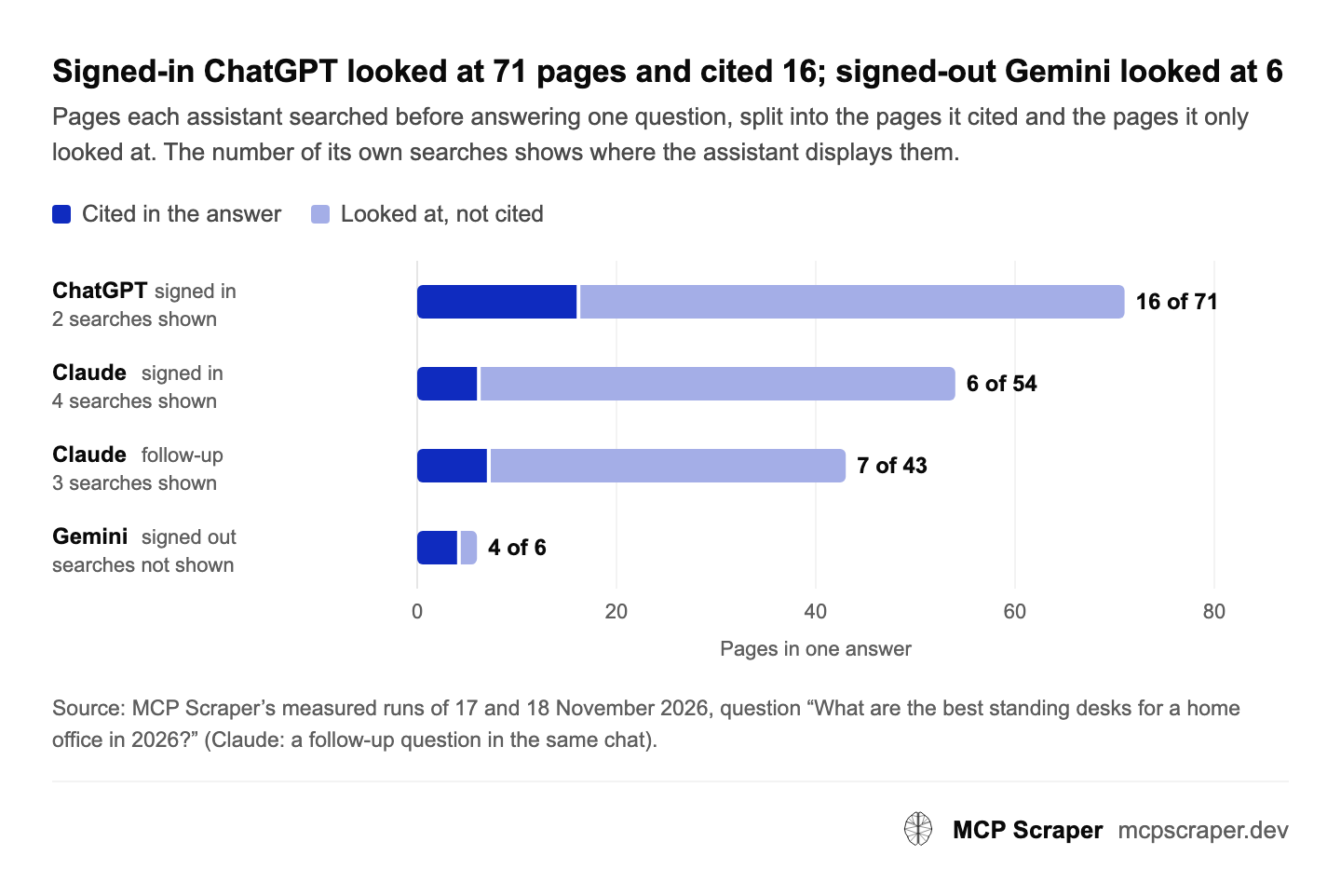
Before an assistant answers, it searches the web and reads pages. That research is the fan-out, and its size changes with the assistant and with signing in. Signed-in ChatGPT and Claude show their own search queries; signed-out ChatGPT and Gemini do not, so for those you get the pages without the queries. ChatGPT’s product lookups and image searches are listed apart from its web searches.
Pages each assistant searched before answering one question, split into the pages it cited and the pages it only looked at. The number of its own searches shows where the assistant displays them.
| Assistant and run | Search queries shown | Pages searched | Pages cited |
|---|---|---|---|
| ChatGPT, signed in | 2 (plus 6 product lookups, 1 image search) | 71 | 16 |
| Claude, signed in | 4 | 54 | 6 |
| Claude, follow-up question | 3 | 43 | 7 |
| Gemini, signed out | not shown | 6 | 4 |
Source: MCP Scraper’s measured runs of 17 and 18 November 2026, question “What are the best standing desks for a home office in 2026?” (Claude: a follow-up question in the same chat).
Tracking is the same check repeated: a fixed list of questions, asked on each assistant, more than once, saved, then counted. Answers change from run to run, so the rates across many answers tell you more than any one answer.
MCP Scraper does not run on a schedule. Your AI client’s own scheduler or a cron job repeats the run.
In their words, with the brand names to watch and the competitor sites to compare.
In one example, the same question asked twice on Gemini put three brands in a different order each time.
Questions, answers, brand mentions and sources each get a table in your vault.
Mention rate, first-named rate, share of voice and cited rate, then turn them into a finished report.
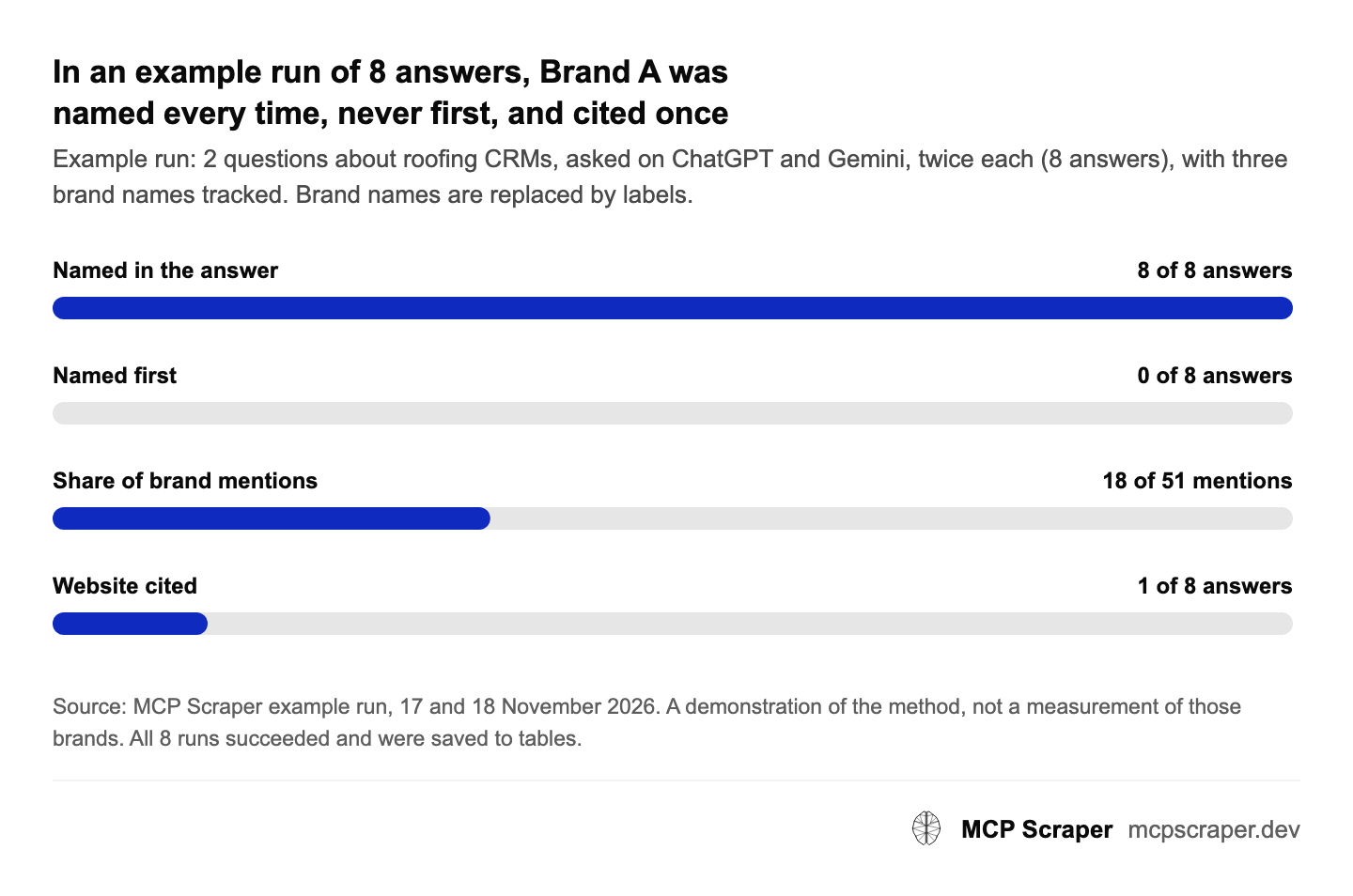
Example run: 2 questions about roofing CRMs, asked on ChatGPT and Gemini, twice each (8 answers), with three brand names tracked. Brand names are replaced by labels.
| Measure | Count | Out of |
|---|---|---|
| Brand A named in the answer | 8 | 8 answers |
| Brand A named first | 0 | 8 answers |
| Brand A's share of all brand mentions | 18 | 51 mentions (35%) |
| Brand A's website cited | 1 | 8 answers |
Source: MCP Scraper example run, 17 and 18 November 2026. A demonstration of the method, not a measurement of those brands. All 8 runs succeeded and were saved to tables.
When the numbers are in, ask for the report: one finished page with charts, from visibility and share of voice to what happened to the website, the sources the assistants used and written next steps.
It draws the numbers your AI collected and saved. Every percentage sits beside its number of answers, and fewer than 10 answers is labelled a small sample. See the example PDF (6 pages).

A mention check (a signed-out run on ChatGPT or Gemini) is 20 Credits. A full fan-out (a signed-in run on ChatGPT or Claude, with deeper research and the search queries) is 80 Credits. Failed runs are not charged, and the Credits come from your plan, with no extra monthly fee for tracking. The client report page is free, and a PDF of it is 10 Credits. See the plans.
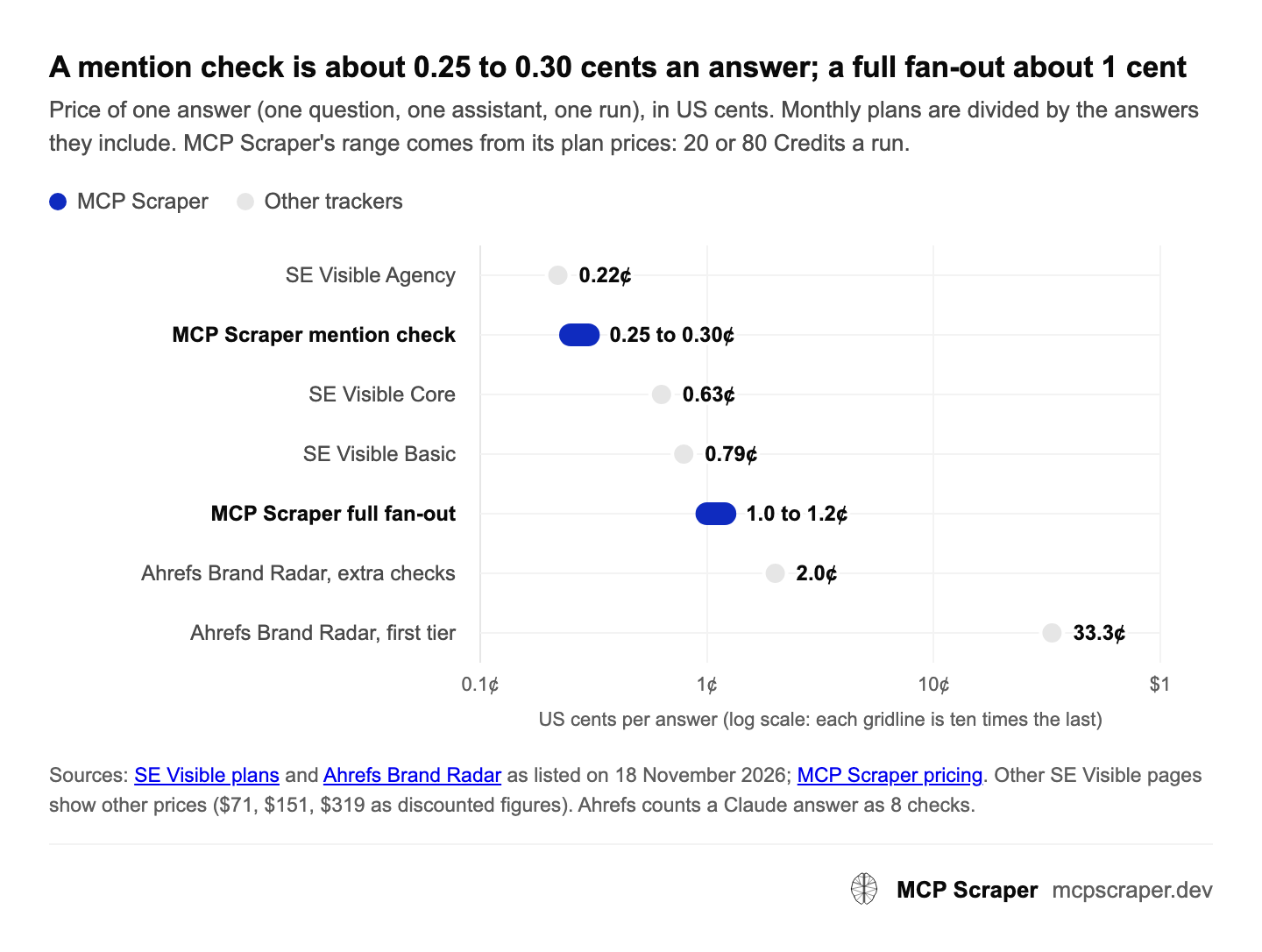
The fair unit is one answer: monthly per-prompt prices hide how many assistants and runs a prompt includes.
Price of one answer (one question, one assistant, one run), in US cents. Monthly plans are divided by the answers they include. MCP Scraper's range comes from its plan prices: 20 or 80 Credits a run.
| Option | Cents per answer | Worked out as | As listed on |
|---|---|---|---|
| SE Visible Agency | 0.22 | $399 a month for about 180,000 answers | visible.seranking.com, 18 Nov 2026 |
| MCP Scraper mention check | 0.25 to 0.30 | 20 Credits at $100 for 800,000 or $12 for 80,000 | mcpscraper.dev/pricing |
| SE Visible Core | 0.63 | $189 a month for about 30,000 answers | visible.seranking.com, 18 Nov 2026 |
| SE Visible Basic | 0.79 | $89 a month for about 11,250 answers | visible.seranking.com, 18 Nov 2026 |
| MCP Scraper full fan-out | 1.0 to 1.2 | 80 Credits at the same plan prices | mcpscraper.dev/pricing |
| Ahrefs Brand Radar, extra checks | 2.0 | $0.020 a check | ahrefs.com/brand-radar, 18 Nov 2026 |
| Ahrefs Brand Radar, first tier | 33.3 | $50 a month for 150 checks | ahrefs.com/brand-radar, 18 Nov 2026 |
Sources: SE Visible plans and Ahrefs Brand Radar as listed on 18 November 2026; MCP Scraper pricing. Other SE Visible pages show other prices ($71, $151, $319 as discounted figures). Ahrefs counts a Claude answer as 8 checks.
The trackers run daily on their own. Here your AI client’s scheduler or a cron job does the repeating.
Nothing updates on a screen by itself. On request you get a finished report page, free, and its PDF for 10 Credits.
ChatGPT, Gemini and Claude. Google’s AI Overview comes from the separate Google search tools.
A brand counts when its exact name appears, in any case. Add each spelling you want counted as its own name.
It is asking AI assistants the questions your buyers ask, from a fixed list, and recording whether your brand is named and your site is cited, run after run. With MCP Scraper each check runs from your AI client and the results are saved to tables.
No. It runs when it is asked. To repeat a list every week, use your AI client’s own scheduler or a cron job that calls it.
There is no live dashboard that updates by itself. When you ask, your saved numbers become a finished report page with charts, in your client’s colour and logos. The page is free; a PDF of it is 10 Credits.
ChatGPT, Gemini and Claude. Google’s AI Overview is covered by MCP Scraper’s separate Google search tools, not by this check. Perplexity, Copilot and Google’s AI Mode are not covered by it.
Assistants write each answer fresh, so the brands they name and the order can change between runs. Ask each question more than once and compare rates, not single answers.
By exact name, in any case, for up to 25 names a check. A shortened name or a misspelling is not counted unless you add it as a name of its own.
Not for ChatGPT and Gemini. Claude needs a saved signed-in profile, set up once. A signed-in ChatGPT run researches more deeply and shows its searches; that is the 80-Credit full fan-out.
In our runs, Gemini signed out took 11 to 14 seconds, ChatGPT signed out 12 to 26 seconds, and ChatGPT signed in with web research 55 to 69 seconds.
Yes. Pass their domains and each one gets the same outcome as yours: cited, looked at but not cited, or absent.
There is no free tier. Starter is $1 for the first month, then $12 a month with 80,000 Credits, and a failed run is not charged.